Simply add a border with the column options
With emyspot's website creation tools, you can put a border around a text, a paragraph or an image very easily. You simply use the border option in the settings of a column of your content.
Edit a page of your site. Then open the column options and select the option that adds a border:
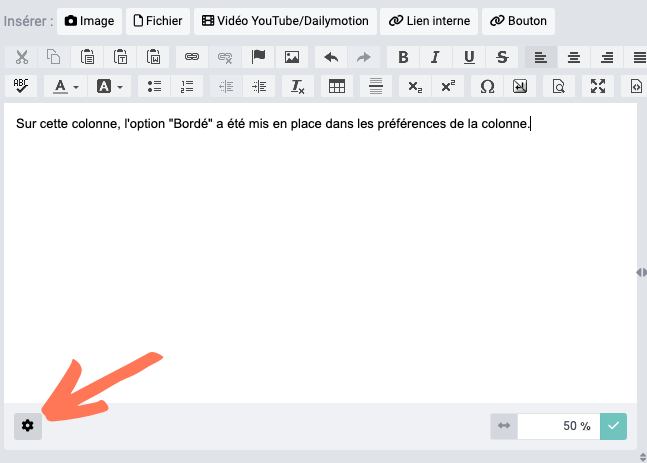
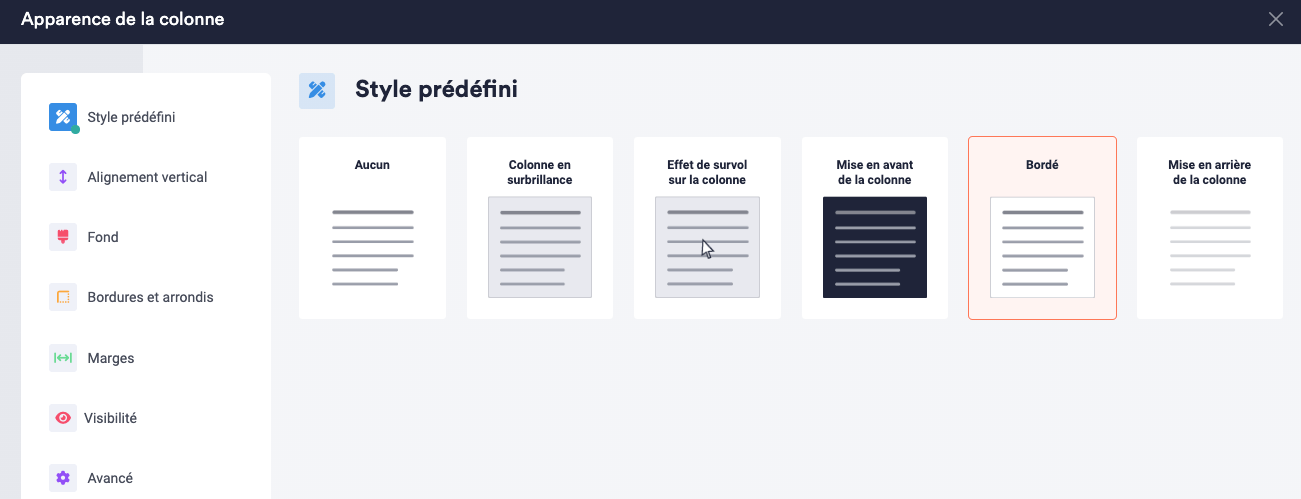
You can customise the colour of the border or of the background from the manager in Settings > Design > Personalize.
Add a border to an element of the site in HTML/CSS
You can also create frames with HTML and CSS.
This text is in a frame.
There are 2 possible methods, using:
- HTML code and your site's CSS style sheet
- HTML elements and inline CSS
Using HTML code and your site's CSS style sheet
To do this, switch the visual editor to the HTML editor and add a CSS class to the paragraph or piece of text to frame (in a span tag). In CSS you need to define 3 characteristics for the border: its size, its style and its colour. Also add an inner margin so that the text is not stuck to the border.
Here is the HTML code used:
<span class="encadrer-un-contenu">This text is in a frame.</span> And here are the CSS styles applied to the encadrer-un-contenu class:
.encadrer-un-contenu{ border: 1px solid black; padding: 5px; } The CSS rules are to be applied in Settings > Design > Personalize, in the Add or edit theme CSS section at the bottom of the customisation form.
CSS offers many ways to customise borders (rounded, dotted, double-line, etc.).
Using inline HTML elements and CSS
To frame text in HTML, switch the visual editor to the HTML editor and use the <p> (paragraph) tag. This tag defines a paragraph of text and lets you apply styles to the content it contains. For example:
<p style="border: 1px solid black; padding: 10px;" >This text will be framed thanks to the <p> tag and the CSS styles defined.</p>This code will display a paragraph of text framed by a black border with 10 pixels of inner spacing. Other tags can also be used to frame text, such as <div> (division), <blockquote> (block quotation) or <pre> (preformatted text). Each of these tags has its own meaning and can be used appropriately depending on the structure and appearance you want for your content.