Meaning of the copyright symbol
The "C" in a circle is used to show that a work is protected by copyright.
To assert your copyright, use this symbol and add the following details:
- The year of creation or publication
- The wording "all rights reserved"
Note that in many countries, including the UK, copyright exists automatically and requires no registration.

Insert the copyright symbol
To add this symbol to your content, use the following keyboard shortcuts:
- On Windows: Alt + 0169 (on the numeric keypad)
- On Mac OS: Option (Alt) + G (UK and US keyboards)
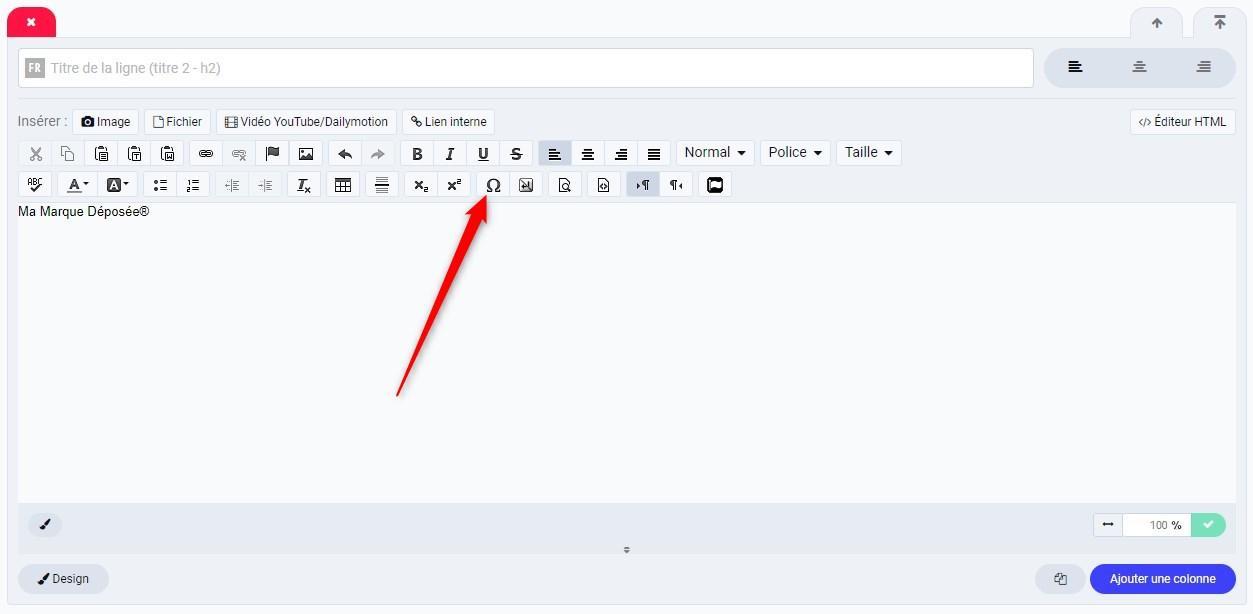
You can also select this special character directly from a visual editor.
To do so, click the omega symbol Ω in the toolbar (see the screenshot) and select the copyright symbol in the pop-up window that appears.
Or simply copy and paste the character in question: ©
Going further
In the same vein, you can insert other special characters with keyboard shortcuts or the Insert special character option of the visual editor.
The registered trademark symbol ®, for example, can be selected with the omega button Ω in the toolbar or added using the following keyboard shortcuts: Alt + 0174 or Alt + 174 on Windows and Option (Alt) + R on Mac OS.